
Getting Started Guide
Welcome to Shepherd Staff Affiliate Hub! Follow these simple steps to get started.
First Time Here?
If you received an email invitation, you're in the right place! This guide will walk you through the registration and verification process step by step.
You'll receive an email invitation to join Shepherd Staff Affiliate Hub. Click the link in the email to get started.
- Check your email inbox for an invitation from Shepherd Staff
- Click the 'Access the Portal' button in the email
- You'll be redirected to the login page
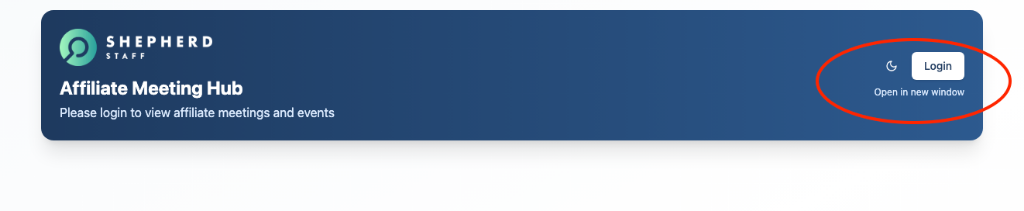
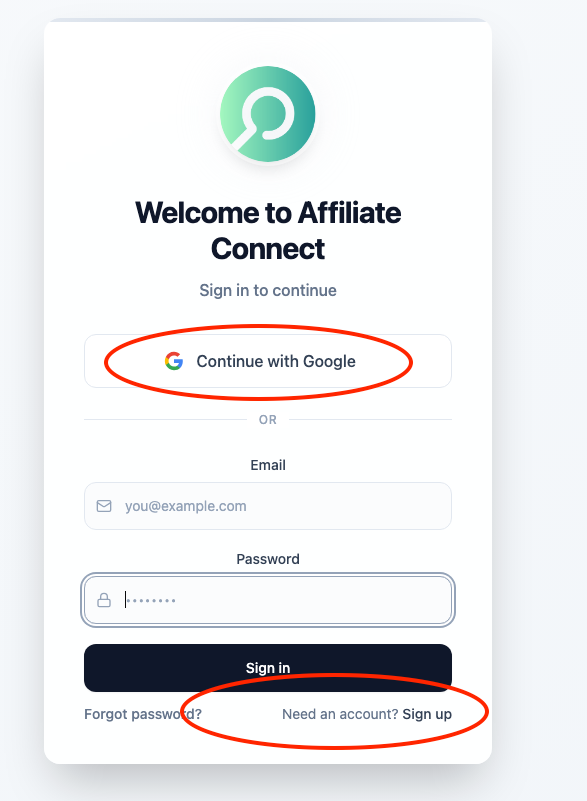
If this is your first time, you'll need to create your account. If you already have an account, simply log in.
- Enter your email address (the one that received the invitation)
- If you're new, click 'Sign Up' to create your account
- If you have an account, click 'Login' and enter your credentials
For security, you'll need to verify your email address with a one-time code.
- Check your email for a verification code
- Enter the 6-digit code on the verification screen
- Click 'Verify' to confirm your email address
You're all set! You now have full access to the Affiliate Hub.
- Access upcoming meetings and events
- View and respond to messages
- Browse job opportunities
- Connect with other affiliates
Need Help?
If you're having trouble with the registration or verification process, please contact the administrator who invited you. They can resend your invitation or help troubleshoot any issues.